
Launch price $9.99 · first 500 buyers, then $19
What your AI agents left inside System Data
Claude Code, Codex, Claude Desktop and your developer tools leave gigabytes inside System Data. Wipecraft names every piece, weighs it and says what happens if you remove it.
Scanning is free · macOS 14 or later
Container
System Data
298.5 GB
On the author's Mac
| Sender | Contents | Weight | Disposition |
|---|---|---|---|
| Claude Desktop | VM bundles and caches | 12.5 GB | Your call In use |
| Simulators | Each device with its size and last use | 68.8 GB | Your call |
| Claude Code | Session histories, file history, shell snapshots and debug logs | 2.6 GB | Your call |
| Local Models | Ollama, LM Studio and Hugging Face models, with last use | 5.7 GB | Your call |
| Package Caches | npm, pnpm, Yarn, pip, Homebrew, CocoaPods, Cargo and more | 17.8 GB | Comes back |
| Xcode | Build data, archives and device support files | 18.8 GB | Your call |
macOS shows one number
Declared by
On the author's Mac
AI agents and AI apps
| Sender | Contents | Weight | Disposition |
|---|---|---|---|
| Claude Code | Session histories, file history, shell snapshots and debug logs | 2.6 GB | Your call |
| Codex | Sessions, thread history and log databases | 3.2 GB | Your call |
| Claude Desktop | VM bundles and caches | 12.5 GB | Your call |
| Cursor | Caches | Safe to remove | |
| Local Models | Ollama, LM Studio and Hugging Face models, with last use | 5.7 GB | Your call |
| Worktrees | Finished worktrees from any agent, with branch and last change Your files | 14.8 GB | Your call |
Developer tools
| Sender | Contents | Weight | Disposition |
|---|---|---|---|
| Xcode | Build data, archives and device support files | 18.8 GB | Your call |
| Simulators | Each device with its size and last use | 68.8 GB | Your call |
| Package Caches | npm, pnpm, Yarn, pip, Homebrew, CocoaPods, Cargo and more | 17.8 GB | Comes back |
| Build Artifacts | node_modules and build folders in projects idle for 30 days Your files | 3 MB | Your call |
| Editors | VS Code, JetBrains and Android Studio caches and logs | 474 MB | Comes back |
| Android | Emulators and unused system images | 30.1 GB | Your call |
| Docker | Images, volumes and unused build cache | Your call |
Handling instructions
- Nothing comes selected. You choose every row.
- Work in progress is locked while an agent runs.
- Quarantine · 7 daysAnything that does not rebuild itself waits 7 days in Quarantine.
- Irreversible actions are named and asked twice.
The real window
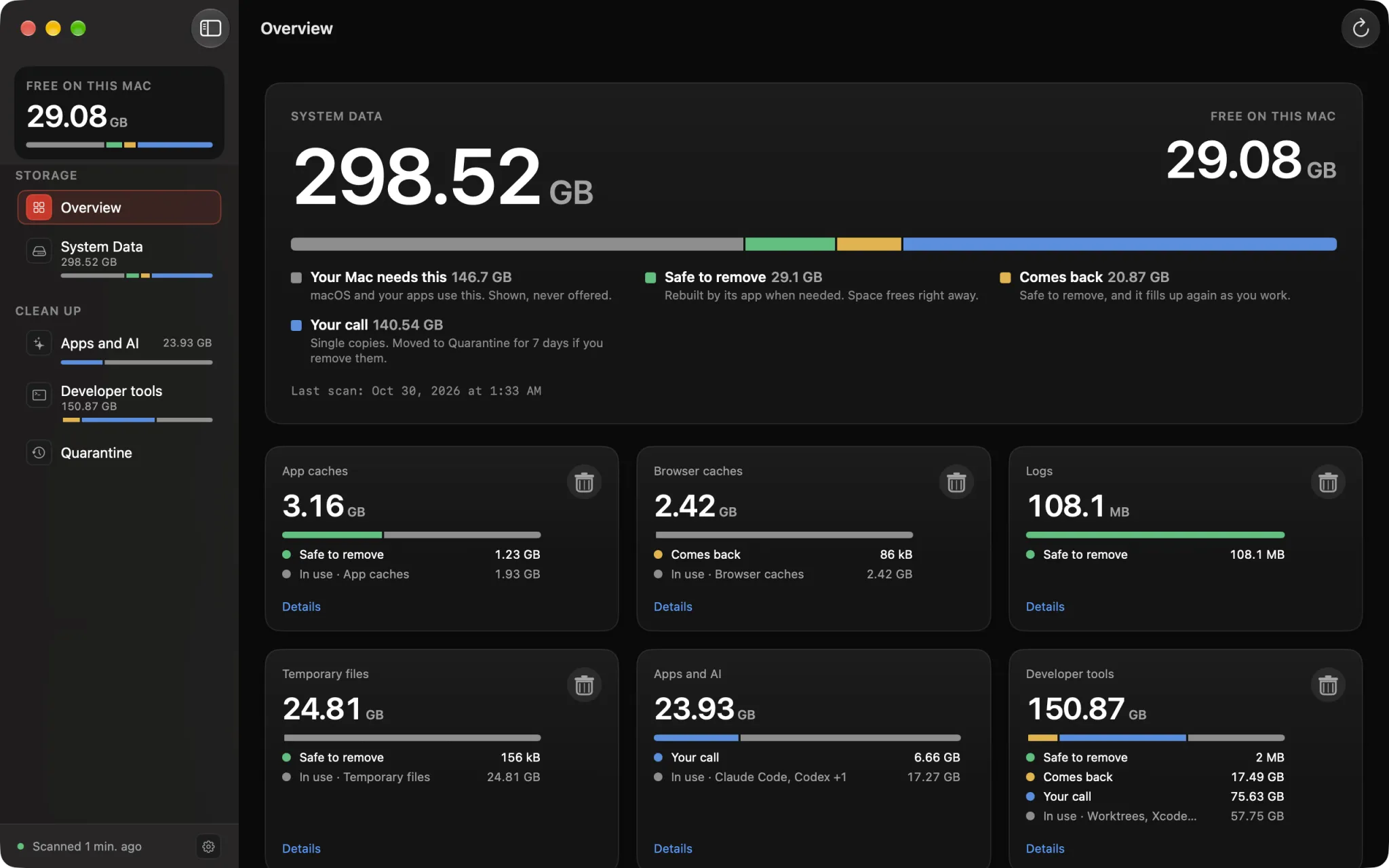
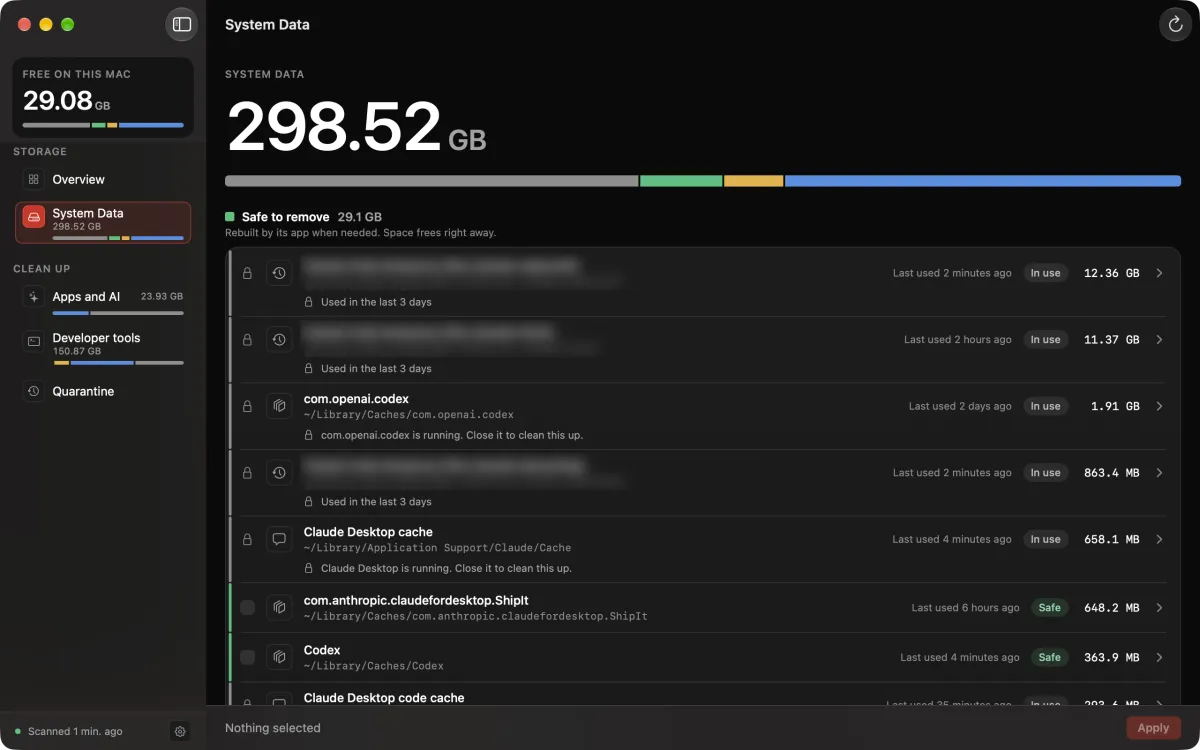
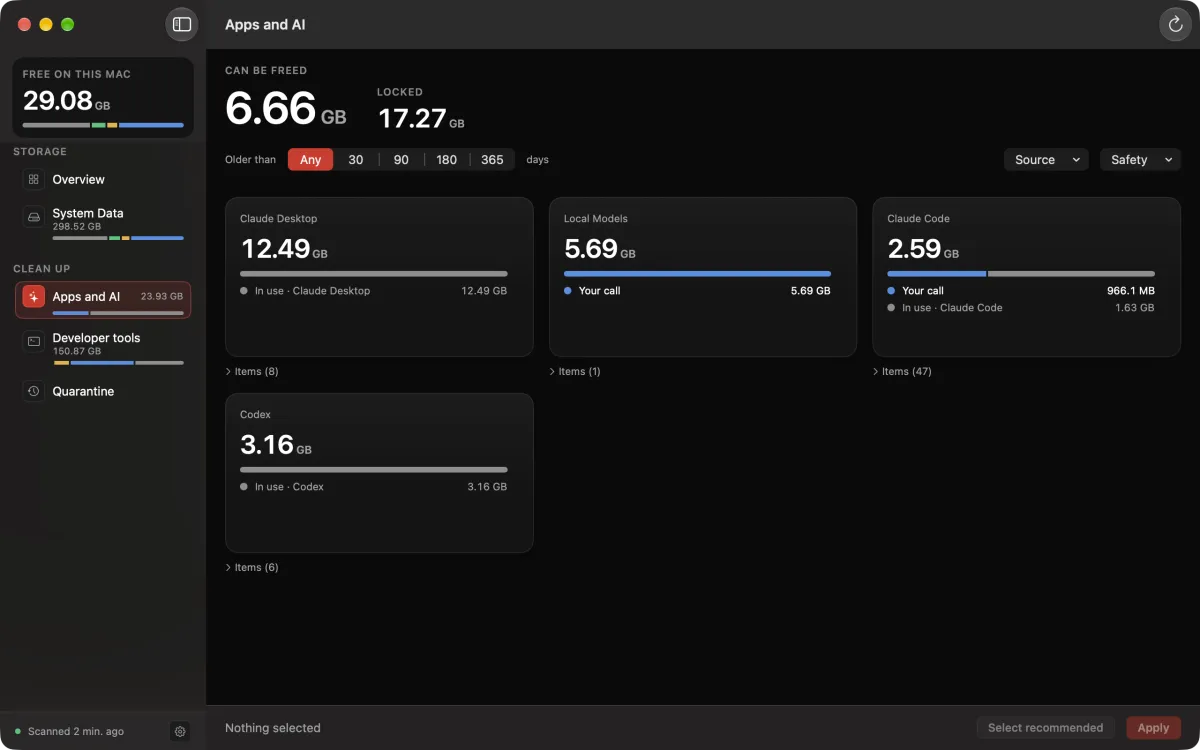
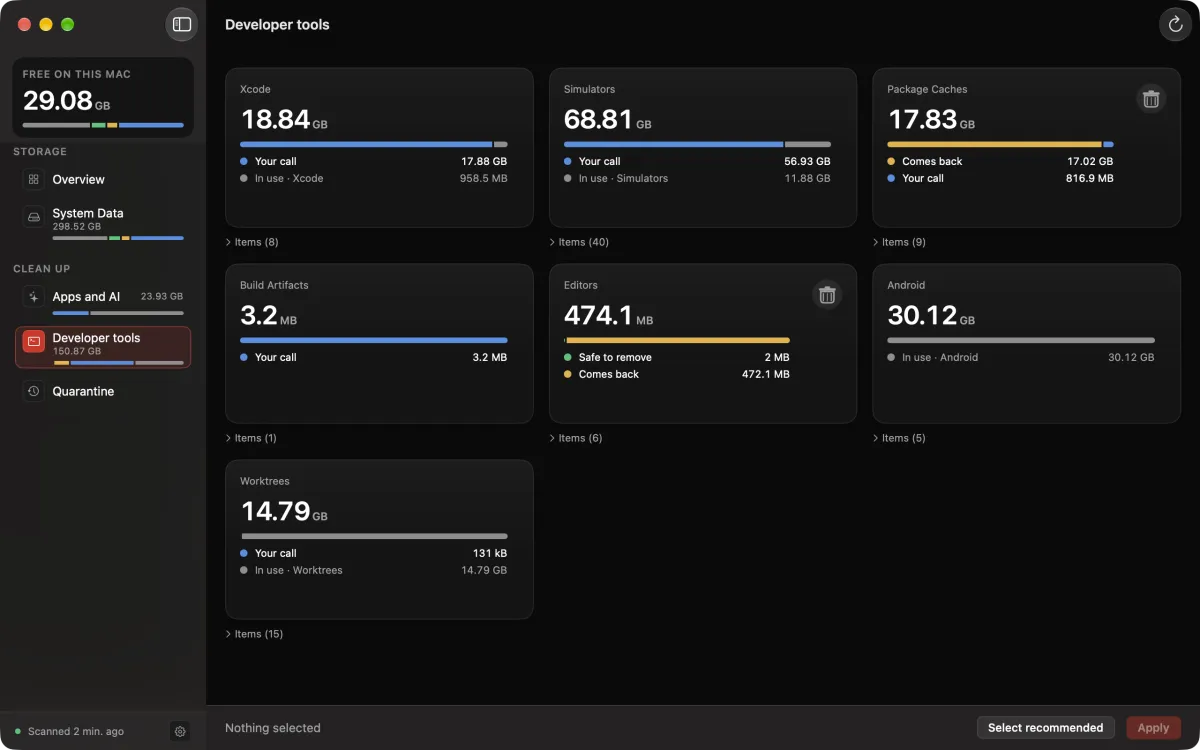
Project and branch names blurred
From the terminal and inside your agent
$ wipecraft scan
Can be freed: 101.1 GB
…
Package Caches     17.83 GB
Local Models        5.69 GB
…
Editors            474.1 MB
…
Build Artifacts      3.2 MB
Claude Code and other agents
/wipecraft:status summarizes the scan inside Claude Code. wipecraft mcp lets Codex, Cursor and other agents read the same results.
Wipecraft sends no file name, path or scan result anywhere. Coding agents you connect can read scan results (titles, paths and sizes) through a local connection on your Mac. An agent backed by a cloud service may send what it receives to its own provider, under that provider's terms.
Not on this manifest
- No uninstaller.
- No RAM cleaning.
- No antivirus or malware scan.
- No "speed up your Mac".
- No subscription.
- No account.
- No telemetry and no analytics in the app.
- The scan reads sizes, dates and tool status (git, simctl, Docker) on this Mac. It uploads nothing.
Waybill
$9.99 one-time for the first 500 buyers. Then $19.
- One license works on 2 Macs.
- Scanning is free. Cleaning up needs a license.
- Updates for this major version are included.
- 14-day refund, no questions.
- No subscription and no account. Payment through Polar.
Questions
Is the scan really free?
Yes. The full scan, every row and its details, and the monitoring alerts work without a license. Moving files to Quarantine, archiving and removing need a license.
Does Wipecraft delete anything on its own?
Not by default. Nothing comes selected, and nothing is removed until you choose Apply. Items you already put in Quarantine are removed after 7 days; that happens when Wipecraft opens and during the daily check. Three optional settings can move or remove items without you pressing Apply, once you turn them on: cleanup rules (Settings > Automatic cleanup), tidying a finished worktree after a Claude Code session, and cleaning through MCP when an agent asks. All three are off by default, and each goes through the same checks as the app: locked rows and items that changed since the scan are refused.
What happens if Claude Code or Codex is running?
The sessions it has open, anything it changed in the last 24 hours, and the worktree it works in are locked. For Claude Code, the latest month of the project it works in is locked too. Older sessions stay selectable. If Wipecraft cannot tell whether a tool is running, those rows stay locked until the next scan.
Can I lose commits when a worktree is removed?
Wipecraft offers a worktree whose repository is present only when it is clean, unchanged for 7 days (by default), and its commits are on the main branch or on a remote. Commits on its branch stay in the repository. A worktree whose commits are on no branch is not offered. The exception is a worktree whose main repository was moved or deleted: git cannot check it, so Wipecraft offers it after 30 days without changes (the default) and moves the whole folder to Quarantine, where Restore brings it back.
Does it phone home?
For two things: your license (when you activate it, with your Mac's name as the activation label; once per launch to check it; and when you remove it from a Mac) and update checks. One optional check asks GitHub, through your own gh login, whether a branch's pull request was merged. It sends branch names and commit IDs, runs only when gh is installed and signed in, and you can switch it off in Settings. Wipecraft sends no file names, paths or scan results. The privacy page lists what each call contains.
Does the Claude Code plugin or an agent send anything?
Wipecraft sends nothing. The plugin and wipecraft mcp pass results to the agent on your Mac. /wipecraft:status gives Claude the scan output, including folder paths, and the session-start line gives it one line with sizes, so Claude's provider receives what you see in that session. The same holds for any agent you connect through MCP.
Can an agent clean my disk?
Not unless you turn it on. Reading is always allowed. Cleaning through MCP is off until you switch it on in Settings > Agents, needs a license, shows a plan before it applies, and does for each id it names what wipecraft clean --apply does: caches, logs and temporary files that their app rebuilds are removed directly and cannot be restored, other files move to Quarantine for 7 days, session histories go to the Archive, and a finished worktree is removed with git. Actions marked "Irreversible" are refused. Tidying after a Claude Code session is a separate switch, also off by default.
Why don't I see Codex or my worktrees?
They are part of Developer mode. It adds coding agents, worktrees, Xcode, simulators, package caches and Docker. It is on by default when Wipecraft finds a ~/.claude folder or Xcode; otherwise turn it on in Settings > Developer mode. It applies to the next scan.
Why does it ask for Full Disk Access?
macOS lets apps read some folders, such as Mail downloads, Messages attachments and iOS backups, only with Full Disk Access. You can skip it. Your user folders are still scanned, and Wipecraft tells you which folders it could not count.
What if my Mac is offline?
Everything keeps working, and nothing locks. Wipecraft checks the license again the next time it opens with a connection.
What do I need?
macOS 14 Sonoma or later, on Apple Silicon or Intel. Wipecraft is sold directly, not on the Mac App Store. The interface is in English, Simplified Chinese, Japanese, German, French, Spanish, Brazilian Portuguese, Korean, Russian, Italian and Turkish, in light and dark mode. It follows the language of your Mac.